For 802.11(b or g) Wireless Networks or other 2.4GHz Applications – by Gregory Rehm

Got no dough for a commercial WiFi antenna? Looking for an inexpensive way to increase the range of your wireless network? A tin can waveguide antenna, or Cantenna, may be just the ticket. This design can be built for under $5 U.S. and reuses a food, juice, or other tin can.
I am not an electrical engineer, nor do I have access to any fancy test equipment. I’ve built some antennas that worked for me and thought I would share what I learned. I have no idea if this is safe for your radio or wireless network equipment. The risk to you and your equipment is yours.
Building your Cantenna is easy, just follow these steps.
- Collect the parts
- Drill or punch holes in your can to mount the probe
- Assemble the probe and mount in can
Collect the parts:
The BOM . You’ll need:
- A N-Female chassis mount connector.
- Four small nuts and bolts
- A bit of thick wire
- A can
The Connector
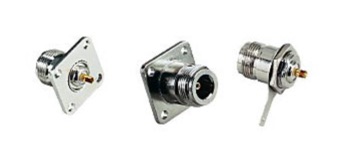
A N type Female Chassis-mount connector. One side is N-female for connecting the cable from your wireless equipment, and the other side has a small brass stub for soldering on wire. These can be found at electronics stores internet suppliers (see the list below under “Connect your antenna…” If you shop around, you should be able to find these for $3-$5.
Nuts & Bolts
You’ll need them just long enough to go through the connector and the can. I’ve used #6×1/4″ stainless. If your N-connector is a screw on type, then you won’t need the nuts and bolts.
Wire
You’ll need about 1.25″ of 12 guage copper wire. This wire will stick into the brass stub in the N-connector.
A Can
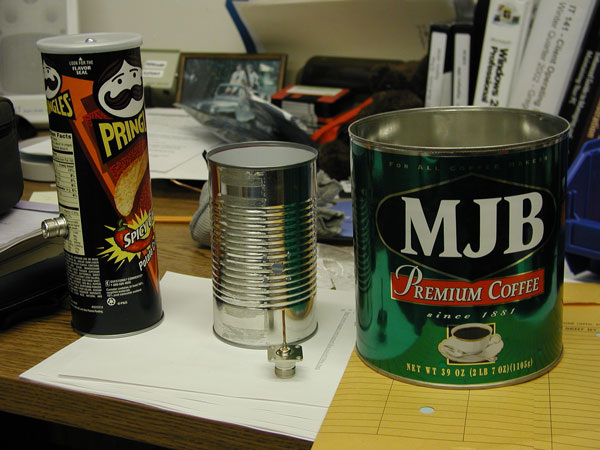
This is the fun part. You’re looking for a can between about 3″ and 3 2/3″ in diameter. The size doesn’t have to be exact. I made a good antenna with a Nalley’s “Big Chunk” Beef Stew can that was 3.87″ in diameter. Others have reported good results with big 39oz. coffee cans that are 6″ in diameter. The pringles can is really too small for good performance, however. Try to get as long a can as possible. The old fashioned fruit juice cans should work well.
Drill or punch holes in your can to mount the probe
The N-connector assembly will mount in the side of your can. You need to put holes in the right place to mount the connector. The placement of the hole and connect is very important. It’s location is derived from formulas that use the frequency that the antenna will operate at and the can diameter. To make life easy on you, here’s a calculator to figure it out for you.
Enter the diameter of your can above and click on the calculate button. 802.11b and 802.11g WiFi networking equipment operates at a range of frequencies from 2.412 GHz to 2.462 GHz. Ideally, with your can size, the TE11 cut-off frequency should be lower than 2.412 and the TM01 cut-off should be higher than 2.462. It would be good, also, if your can is longer than the 3/4 Guide Wavelength. If your can is a little off in length or diameter, don’t despair, experimentation is fun!
You want to mark the location on the can where you will put the hole for the connector. The 1/4 Guide Wavelength number tells you how far up from the bottom metal end of the can to put the center of the hole. Open only one end of your can, eat the contents, and give it a good washing. You’ll probably want to remove the label too. Use a ruler to measure up from the closed end 1/4 Guide Wavelength and mark the can with a dot.
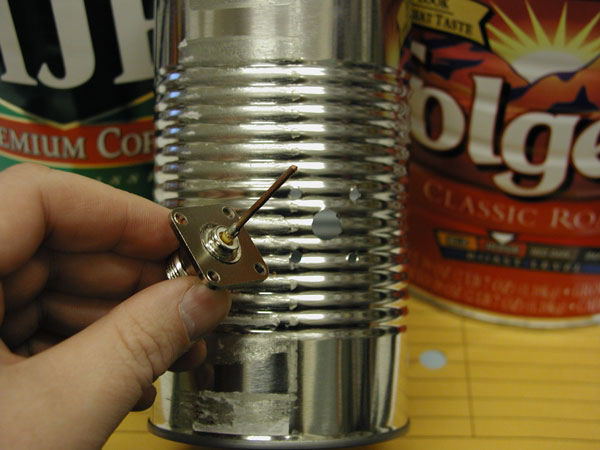
If you’ve got a drill, select a bit that matches the size of the center of your connector. You may want to start with a small bit and work the hole larger and larger. You could even start with a hammer and nail, then use drill bits. If you don’t have a drill, start with a nail hole and use a file to get the hole to the required size. If you’re using a bolt on connector, make four more holes for the bolts – you can use the connector as a drilling guide.
Assemble the probe and mount in can
Now you’ll need that bit of wire. You’ll need a soldering iron or a friend with one as well. Cut the wire so that when it is stuck in the connector as shown, the total length of both the brass tube and wire sticking out past the connector is 1.21″. Get as close to this length as you can.
When you’ve got your wire correctly sized, solder it into the connector keeping it as straight and upright as you can. When it’s cooled, bolt or screw the assembly into your can. Put the heads of the bolts inside the can and the nuts on the outside to minimize the obstructions in your antenna. Your Done!
Connect your antenna to your wireless card or access point
To use your cantenna, you’ll need a special cable commonly called a “Pig Tail”. The pig tail connects your wireless card or access point to you antenna. One end of the cable will have a “N” Male connector (just right for connecting your your cantenna), while the other end will have a connector appropriate to your card or access point. For a good picture of a pig tail, take a look at:
http://www.seattlewireless.net/index.cgi?PigTail
You’ll want to have a wireless NIC or access point with an external antenna connector. Otherwise, you may have to hack into the one you have to hook up the cable. I wouldn’t recommend this unless you’re good with a soldering iron and electronics. For this reason, I like the Agere Orinoco cards which have a nice antenna connector. Pig Tails can be hand made if you have the right tools, but it’s probably easier to get a pre-made one. Try:
- Fleeman Anderson & Bird
Fleeman Anderson & Bird has a “cantenna kit” for sale that includes the connector and pigtail. Choose one of the “cables” links from the menu and look towards the bottom of the list. - Hyperlinktech
- Antenna Systems
Hook up your cable, point the antenna at a friend’s, and see how far you can stretch you network. Be sure to let me know (greg@turnpoint.net) how it works.
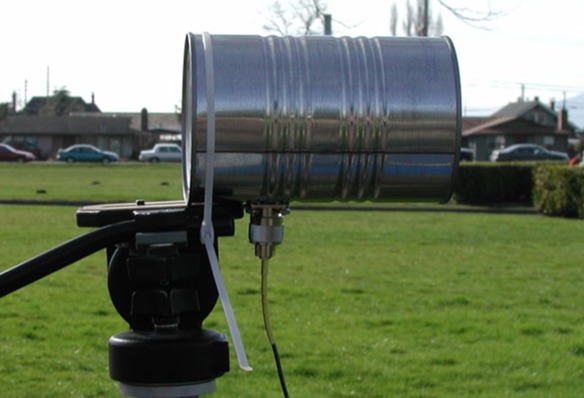
This antenna has linear polarization. That means that how you rotate the antenna will affect the strength of your signal. Usually, you will want to put the connection straight down, but experiment with rotating the can while watching the signal strength on your PC to get the best performance.
Copyright 2003-2007 Gregory Rehm – All rights reserved.
For information about reproducing this article in any format,
contact the author: greg@turnpoint.net
Article originally available at http://www.turnpoint.net/wireless/cantennahowto.html