Skip to content

IW5EDI Simone – Ham-Radio

Amateur Radio made in Italy

Menu
  • About me
    • QSL info
    • Log Book OnLine
    • What I Hear
    • Live Stream
    • Perchè (Why) in English ?
    • Contact me
    • Privacy info
  • Software
    • Ham Radio Deluxe 5.2
    • IP-Sound
    • OscillometerXZ
    • YO Yagi Optimizer
    • HamAlyzer 2.8
    • ERP Calculator
    • 59+ software
    • Magnetic Loop Calculator
    • MeterMate
    • UDY 2 Voice Keyer
  • Ham Radio
    • Beginners Guide to Ham Radio
    • Direct QSLing from Italy
    • Foreign Ham Operations in Italy
    • Tourist Ham Radio in Italy
    • Frequency List
    • Metric Conversion Table
    • Sound Card Interfacing for RTTY, PSK31, and SSTV
  • Technical Articles
    • Microphone Connections
    • A low cost 600 watt ultra-linear amplifier
    • VE7AVV – YAESU FL-2100Z Amplifier Repairs
    • Mic Wiring – Ham Radio
    • Homebrewing a balun
    • Grounding Concepts
    • HF Scanning frequencies
    • Wi-FI: Measuring network throughput
    • Determining RFI problems in mobile
    • Hidden and stealth antennas
  • Antennas
    • 144 / 430 Dual Band J-pole antenna
    • 10 Meter 4 Element Quad Antenna
    • 144 Mhz Magnetic Loop Antenna
    • A “loopy” Loop Loaded Vertical
    • W5GI Mystery Antenna
    • A Multiband Dipole
    • Build a W3DZZ Antenna
    • A portable 2-element VHF yagi
    • Assembling GAP Titan DX Antenna
    • The Galaxy Dipole
    • Pfeiffer Maltese Quad Antenna System
    • Magic Anti-Jamming antenna
    • D3+ High Performance Antennas
    • EH Antenna for 40 and 20 meters
    • Homebrew G5RV
    • 40 meter mini Moxon Antenna
    • EH Antenna for 10 meter
    • Quad and ModQuad Antenna
    • Inverted U antenna for 160 meters
    • 6 Band HF Windom antenna
    • The Bazooka Antenna
    • Antennas for HF mobile operation
    • Inverted L Antenna for Low Bands
    • Your first dipole
    • Remote control Antenna Switch
    • The gin pole
    • Hexbeam antenna setup
    • W4TI Rotor Installation
Menu

Sound Card Interfacing for RTTY, PSK31, and SSTV

Who needs a collection of interface connections to choose from when having a desire to use the Soundboard in their computer to provide capability for using RTTY, PSK31, and SSTV modes on the amateur bands?  Well from my experience the answer is many of us, me included.  After a large amount of research I found the following circuits helpful when setting up my own system.  If you have problems setting input and output levels to your sound card you should consider a resistive pad in the input or output circuits as shown in following interfaces.  Do you need the pad?  Well consider my level discussion (click here).  Hope these interface circuits and level discussions are of some value to all.  Nothing like ideas you know.

One of the best sources for interfacing both the soundboard and TNC’s is contained on N1RCT’s home page.  Dick has done a great job both graphically and via words to describe interfacing. Try this URL as a real source to provide ease of headaches when it comes to interfacing:   Dick Stevens, N1RCT .

      JVCOM Interface
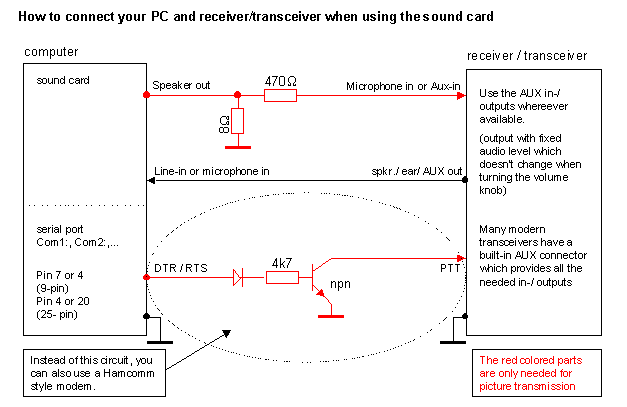
 

The above circuit is recommended for use in SSTV applications with use of the sound card with a computer.  This is the JVComm style of interface.  This circuit may also be used for RTTY and PSK31 applications.  Many users modify the above circuit to include 1:1 isolation transformers within the Speaker out and Line-in or microphone in lines.  These isolation transformers are used to preclude ground loops within a system from introducing hum and interference on the transmitted signals.


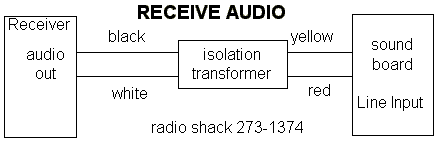
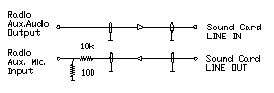
The following circuit is used in applications of WinRtty for receiving RTTY signals using the sound card.  This circuit is also applicable to SSTV and PSK31 modes and works well in all three applications.  This circuit may be implemented into the JVComm interface shown above as discussed in the JVComm interface text.  Note that the sound board and receiver are transposed in the two circuits.


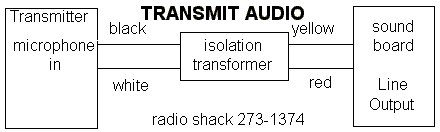
The following circuit is used in applications of WinRtty for transmitting RTTY signals using the sound card.  Notice this circuit does not have a PTT component and relies on VOX for transmit control.  This circuit is also applicable to SSTV and PSK31 modes and works well in all three applications.  This circuit  may be implemented into the JVComm interface shown above as discussed in the JVComm interface text.  Note that the sound board and transmitter are transposed in the two circuits.
  

So you say “I want FSK capability as well as Push-To-Talk” (PTT).  The following circuit is used with WinRtty to provide capability for FSK Rtty and a PTT circuit for the program.  This circuit may be used in many applications and may be substituted for the circuit contained in the JVComm interface shown above.
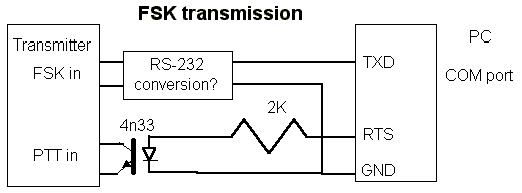
 

What goes in the “RS-232 conversion” box depends on your transmitters FSK input.  Odds are, it can be exactly the same as the circuit shown for the PTT connect: use an opto-isolator with a series resistor to convert the RS-232 levels to open/close keying.  The portion of this circuit related to PTT may also be used instead of the PTT circuit in the JVComm interface described above.


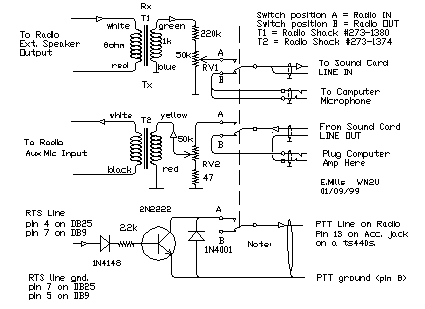
Another approach to interfacing is contained in the following schematic obtained from WM2U’s home page related to PSK31 and should work for PSK31, RTTY, and SSTV.

The simplest and quickest computer to radio interface is to connect the Line Output from the Sound Card to the transceiver audio input with a 100:1 voltage
divider to reduce the voltage output, and the Sound Card Line Input to the audio output of the radio. You can use the VOX to switch from Receive to Transmit.
To setup this arrangement, adjust the sound card output level using the computer ‘mixer’ control until maximum transmit power is reached, and the ALC is
 just starting to read. Then tune to a strong carrier and adjust the soundcard input gain until the red line goes away as observed on the spectrum display.
(waterfall indicator) This procedure is covered in great detail in the PSK31 Help files under “setting up the sound card”.


The circuit below shows the method WM2U used which isolates the Sound Card Line In and Line Out from the Radio using a couple of Radio Shack transformers, and a 2N2222
transistor to switch the PTT radio line triggered by the RTS line of the computer Com Port. All audio levels are equalized when running either the computer, the SSTV program
or PSK31. A switch is used to switch between Computer and the Radio Modes. To adjust this circuit, tune to a strong carrier and tweek RV1 until the red overload lines
disappear. At this point simply tweek RV2 to give the required output power from the transmitter.
The author of this information is WM2U. 
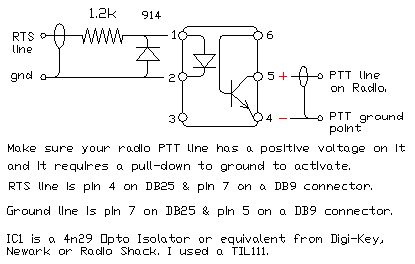
To completely isolate the computer from the radio the PTT line schematic shown above should be replaced by the following optically coupled circuit. WM2U has this unit installed and it works great.
Another interesting PTT circuit from G3VFP to cover both the RTS and/or DTR source.
You can use a 2N2222 in place of the BC337 transistor in this circuit.


Original article was available here  http://www.w5bbr.com/index.html


Leave a Reply

Your email address will not be published. Required fields are marked *

This site uses Akismet to reduce spam. Learn how your comment data is processed.

IW5EDI Simone

  • Licensed Amateur Radio operator in 1996 as IW5EDI, active member of ARI Firenze and ARRL
  • Class 1970, married with two childrens, love experimenting and antenna home-brewing. IT System Engineer, recently started having fun with morse code and Raspberry Pi


IW5EDI Simone


This Blog is mainly dedicated to Amateur Radio (Ham radio) and contains external articles and personal esperiences.

What is Amateur Radio ?
More Ham Radio Links


Blogroll

  • ARI Italian Amateur Radio Society 0
  • ARI Firenze ARI – Sezione di Firenze 0
  • ARRL Amateur Radio Relay League 0
  • DX Zone Ham Radio Internet Guide 0
  • DXSummit 0
  • DXWatch 0
  • eHam 0
  • Ham Radio Daily Ham Radio News 0
  • IW5EDI on QRZ.com My page on QRZ.com 0
  • Long Delayed Echoes 0

My Content

  • Antenna Projects 0
  • RadioAnnunci.it Mercatino Radioamatoriale 0

Categories

  • Articles (131)
    • Antenna Theory (13)
    • DXing (2)
    • How to (10)
    • shortwave (7)
  • Company and Products (1)
  • DXing (13)
    • QSLing (4)
  • Equipment (97)
    • Antenna (65)
    • Software Defined Radio (6)
  • Featured (28)
  • Ham Radio Events (25)
  • Ham Radio News (1)
  • Ham Radio Software (26)
  • HamRadio (94)
    • Ham Radio 2.0 (16)
    • How to (6)
    • Radio Scanning (6)
  • Homebrew (143)
    • HF Antennas (79)
    • Raspberry Pi (1)
    • UHF Antenna (16)
    • VHF Antennas (38)
  • Photos (4)
  • Short News (4)
  • Video (4)

Comments

  • Charles Mintoff on Ham Radio 2012
  • Roger Sparks, W7WKB on Petlowany Antennas by K6NO
  • Frank Barnes on Ameritron AL-80A restoration project
  • ken m3zkb on W5GI Mystery Antenna
  • Bobby on 5/8 Vertical Ground Plane antenna for 10 meters

RSS The DXZone.com

  • Top Amateur Radio Websites - Issue 2603
  • FT2: New Ultra-Fast Digital Mode Tested on HF
  • Top Amateur Radio Websites - Issue 2602
  • The G3LZR Tribander : The charm of the Impossible Antenna
  • Top Amateur Radio Websites - Issue 2601
  • Amateur Radio Clubs
  • Olivia Digital Mode on HF - Community and Technical Information
  • Notes On Auto Tuners and Portable HF Antennas
  • DXtreme Monitor Log 14 - Radio Spectrum Monitoring Software
  • Sangean ATS-505 Receiver Review

Ham Radio Blog – IW5EDI Simone JN53OR

© 2026 IW5EDI Simone – Ham-Radio | Powered by Superbs Personal Blog theme